Tuesday, May 10, 2011

Example of a simple Bank software Flow plan for an office

Shafeen Planning on paper

Office... bank / Office accounts


Introduction:
This is a mirror of a bank, where all money transaction of all bank account of a company, will be recorded and will generate reports and alerts (high levels alerts will send sms). Here any one can see the current balance any time. So this will be very helpful to understand the current status of profit and to make any financial decision.
Flow chart:
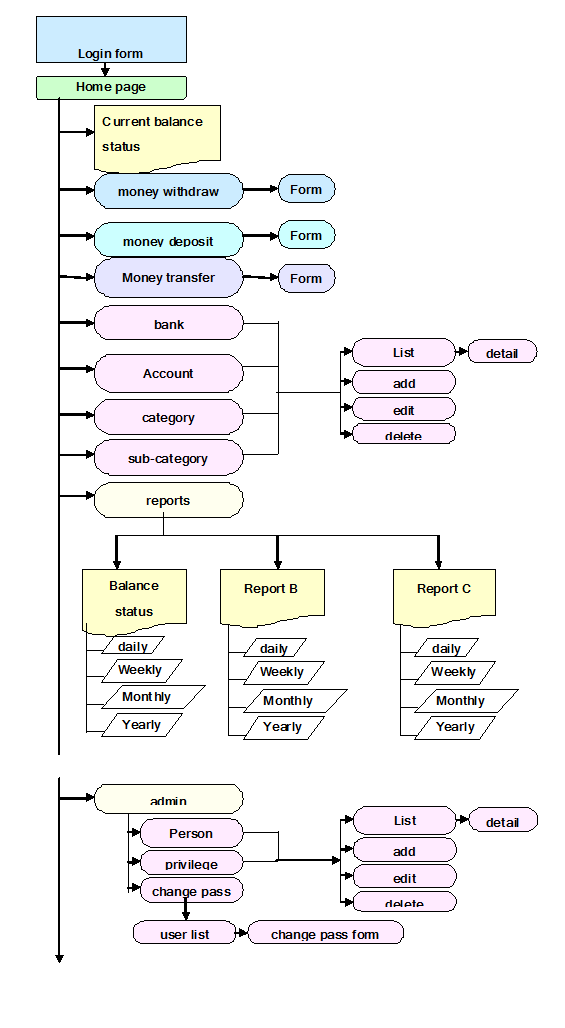
This will be a web based solution. When a user hit the url, It will show the login page. Then, only valid users can see the home page or dash board with related features and link. See below flow chart:
Details:

  1. login:
To authenticate user and her privileges we will use this page. User will give her username/email and password to enter the solution.

  1. home page:
After login in, user will see her balance sheet first. So whenever she logged in, she will see her current balance status at a glance in a table with a graph.

For example: (this is not design a concept, only concept on features)
Other important links will also be available in the home page. They are as follows:

    1. current balance status:
This will be user’s choice, weather she likes to see the table or graph after login. If she chooses to see the table first, then this link will show her the graph of the table. And if she chooses to see the graph first, this link will show the table.
For example:
b)money withdraw:
This link will open a form to enter the money withdraw information. in the form user has to give withdraw date, type of withdraw, reason, person etc and all information will be store in database to create different kinds of reports and alerts.
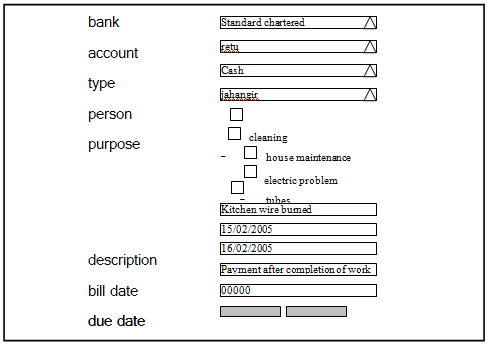
For example:


  1. c) money deposit:

    This form will deposit money in this bank.
    For example:
    d) money transfer:
    Transfer money from one bank to another or from on account to another account. For example:
    e) bank:
                                                                  i.      list
    User will see the list of bank which had been added already with their balance. if user click on view button she will see the detail info of that bank.
    For example:
    ii)  add
    To add a new bank info, user will use a form and submit the new data.
    For example:
    iii)  edit
    When user click on edit button of any particular bank she will see a form, like add form with the current data. Then she can edit and update data.
                                                                iv)      delete
    To delete any bank information totally, user have to select a bank name from the list then click on delete button. Then a confirmation popup will come, if she click on “yes” then that bank information will be removed.
    f) account:

                                                                  i.      list
    This will take user to a list of account no from different bank.
    For example:

    ii)   add
    To add a new account information user has to select a bank (which had been added before) then add the new account name and related information.
    For example:
                                                                  ii)      edit
    Edit page will show up with same form as “add” with current info (which had been added before).
                                                                iii)      delete
    User will select the account no and press delete button.
     g) category:
    When user click on “category” link, she will see the list of category name with link to add category, edit, view and delete category.
                                                                  i.      list
    For example:
    ii) Add

                                                                  iii.      edit
    Same form like add category form with data in edit form. User has to edit data and update it.
                                                                vi.      delete
    Select from the list and press delete.
    h) subcategory:

                                                                  i.      list
    ii) Add

    iii) Edit
    iv) Delete
    I) reports:
    Different kinds of reports could be place here, that’s why I had mentioned report a or b.
                                                                  i.      balance report:
    User can view bank wise balance report by selecting bank and date. Report could be daily, weekly, monthly and yearly.

                                                                  ii.      deposit report:
    This report will show only the deposit information of all accounts. Bank, date, table or graph selection option will be like balance report.
                                                                iii.      withdraw report:
    This report will show only the withdraw information of all accounts. Bank, date, table or graph selection option will be like balance report.
    3. admin:
    Except view different kinds of smart report there is some admin option for the user. Like:
      1. person:
                                                                  i.      list:
    Admin will see all person names that are in the company Including talents, managements, driver, cleaner etc.
    1.      details
    When user click on the view button, she will see the detail information of that person. 
    ii) Add

    III) Edit

    iv) Delete
    To delete any person’s information user will select person or persons name from the list then press delete button.
    b) privilege
                                                                  i.      list
    This page will show the privileges list with add, edit, view and delete option. When user clicks on view button, she will see the detail information and list of the persons, who currently have this privilege access.
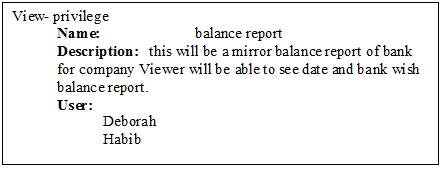
    ii) Add

    iii) Edit
    iv) Delete
    c. change password
                                                                  i.      user list:
    To change any user’s password super admin will see the list of all users with a link to change password form.
    Individual users will only see a form to change their own password.
    1.      change password form
    Conclusion:
    This is primary planning for a account system.

    Sunday, May 8, 2011

    Some site suggestion


    Site Suggestion

     From Shahana


    1. http://www.p-hotels.no/main.html

    Suggestions:

    ·         Non flash version: This site is in flash, could have a non flash version. So that who is not using flash in their computer can view it easily.

    ·         Online booking: Booking could have online. Not only sms. In online booking people can see weather the rooms in their expected days are available or not. They will be able to select, how many room they need, what kind of room they need, form which date to which date, then will send their booking form.

    ·         Photo gallery: Could have some pictures of the hotels like rooms in different angel, bathrooms, gardens, hotel lobby, service, waiters etc in photo gallery.

    ·         Special offer: Any special discount or offer or packages could be given.

    ·         Planning: There could have planning and calculating option, like one room for 4 days then how much that will cost. This link will also be inside online booking link.

    ·         Contact us: Should have contact form to contact online.

    ·         Feedback: Feedback form to have comments about the hotel and web site.

    ·         Location: Location map to show its location.

    ·         Search engine: Key work search engine

    ·         Control panel: Control panel for

    o   Web site content management

    o   Check online booking and replying.

    o   Send special offer by email from existing email database.


    1. http://www.trondheim-booking.no/

    Suggestions:

    ·         Re-design web site: Web site design is very poor.

    ·         English version: Could have an English version for international guests.

    ·         Font size: All fonts in the web site should have same size.

    ·         Special offer: Any special discount or offer could be given.

    ·         Planning: There could have planning and calculating option, like one room for 4 days then how much that will cost. This link will also be inside online booking link.

    ·         Online booking: Booking could have online and also can have sms facilities to contact. In online booking people can see weather the rooms in their expected days are available or not. They will be able to select, how many room they need, what kind of room they need, form which date to which date, then will send their booking form.

    ·         Location: Location map to show its location.

    ·         Search engine: Key work search engine

    ·         Control panel: Control panel for

    o   content management

    o   Check online booking and replying.

    o   Send special offer by email from existing email database.


    1. http://www.munken.no/

    Suggestions:

    ·         Re-design web site: Web site design is very poor. But the hotel pictures are nice.

    ·         English version: Total site could have an English version for international guests

    ·         Online booking: Booking could have online and also can have sms facilities to contact. In online booking people can see weather the rooms in their expected days are available or not. They will be able to select, how many room they need, what kind of room they need, form which date to which date, then will send their booking form.

    ·         Photo gallery: Could have some pictures of the hotels like rooms in different angel, bathrooms, gardens, hotel lobby, service, waiters etc in photo gallery.

    ·         Special offer: Any special discount or offer could be given.

    ·         Planning: There could have planning and calculating option, like one room for 4 days then how much that will cost. This link will also be inside online booking link.

    ·         Contact us: Should have contact form to contact online.

    ·         Feedback: Feedback form to have comments about the hotel and web site.

    ·         Search engine: Key work search engine

    ·         Control panel: Control panel for

    o   content management

    o   Check online booking and replying.

    o   Send special offer by email from existing email database.


    1. http://www.hotel-park.no/

    Suggestions:

    ·         Re-design web site: Web site design of is very poor. But the hotel pictures are nice.

    ·         Scroll bar: Scroll bar shouldn't be middle of the site.

    ·         Photo gallery: Could have some pictures of the hotels like rooms in different angel, bathrooms, gardens, hotel lobby, service, waiters etc in photo gallery.

    ·         Special offer: Any special discount or offer could be given.

    ·         Contact us: Should have contact form to contact online.

    ·         Feedback: Feedback form to have comments about the hotel and web site.

    ·         Location: Location map to show its location.

    ·         Search engine: Key work search engine

    ·         English version: Could have an English version for international guests.

    ·         Control panel: Control panel for

    o   content management

    o   Check online booking and replying.

    o   Send special offer by email from existing email database.


    1. http://www.beta-apartments.no/

    Suggestions:

    ·         Re-design web site: web site design is very poor. Need to re-design the total site

    ·         Web pages: We should have more pages to attract more customers.

    o   Site map

    o   Contact Us

    o   Feed back

    o   Planning & calculation

    o   Online booking

    o   Location Map

    o   Picture gallery


    ·         Special offer: Any special discount or offer could be given.

    ·         Search engine: Key work search engine

    ·         English version: Could have an English version for international guests.

    ·         Control panel: Control panel for

    o   content management

    o   Check online booking and replying.

    o   Send special offer by email from existing email database.


    1. http://www.realinvest.no/

    Suggestions:

    ·         Re-design web site: Web site design could be more polish.

    ·         English version: Could have an English version for international guests.

    ·         Site map: Here we should provide site map. Then user can easily navigate the total site and understand the volume of the site.

    ·         Search engine: Key word and advance search engine to find all info.

    ·         Contact us: Should have contact form to contact online.

    ·         Feedback: Feedback form to have comments about the hotel and web site


    1. http://www.advokat-sorte.no/

    Suggestions:

    ·         Re-design web site: Web site design is very poor.

    ·         Re-organize: Need to reorganize the total site.

    ·         Search engine: Key word and advance search engine to find all info. Like people can search home and agents by any key word or can search by location, price, agents, beds, baths etc.

    ·         Special offer: Any special discount or offer could be given.

    ·         English version: Could have an English version for international customer.

    ·         Control panel: Control panel for

    o   content management

    o   Send special offer by email from existing email database.

    ·         Contact us: Should have contact form to contact online.

    ·         Other links: other links for

    o   get home loan.

    o   Law & licensing

    o    

    ·         Home pictures: all house picture should have on mouse movement. So any body can see the total room by moving his/her mouse.


    1. http://www.btbeiendomsmegling.no/

    Suggestions:

    ·         Re-design web site: Web site design is could be more polish.

    ·         Search engine: Key word and advance search engine to find all info. Like people can search home and agents by any key word or can search by location, price, agents, beds, baths etc.

    ·         Special offer: Any special discount or offer could be given.

    ·         English version: Could have an English version for international customer.

    ·         Control panel: Control panel for

    o   content management

    o   Send special offer by email from existing email database.

    ·         Contact us: Should have contact form to contact online.

    ·         Other links: other links for

    o   Get home loan.

    o   Law & licensing

    o   Terms & condition

    ·         House pictures: all house pictures should have on mouse movement. So any body can see the total room by moving his/her mouse.


    Shahana Shafiuddin

    Am I making some time to sit in front of computer?

    Shafeen took this picture by himself


    When my son came in my life, he took all of my time. It becomes impossible to give a single second to give myself. When he became 2 years old, I get some time when he sleeps. So at night, when he fall in sleep I got some time to come online. Today things are little different. I came online, while he (he is now 2 years and 5 months old) is playing around me. I told him, I will give you the pc to work (as he said, he wants to work with pc) and to see cartoon cinema after completion of my work. He agreed. But he can't stop himself to press keyboard, or moving mouse or to shut down the pc manually suddenly. 3 or 4 times I lost all of my work because of his sudden shut down. Finally I could submit this 8 line post after making him sleep. So, can I make some time to sit in front of pc? Not at all.


    Shahana Shafiuddin


    Thursday, May 5, 2011

    EON


    My husband designed website for this group of company EON. You can see a bit.

    This post is only for Shafeen


     8th May is international mother's day.  On this occasion I am writing this post.


    Dear son, you are still very young. One day you will grow up, will learn how to read. I don't know, on that time weather I will be available or not. When you get born, I pray in my mind that I will protect you from every single problem, as long as I live. But on the next moment my heart bit stopped. Doctors tried to recover with different machines and injections (like steroid).  They had to fight for 9 hours. Then I realize, I can't expect that I can take care of you for your whole life.


    If I can't be with you, please remember, my blessings will be always with you. When you first ride on the plain, you get afraid and start saying, mom is here, and mom is here. Like this way I am always with you. I am praying to Allah that you might never fall in any problem. May Allah protect you in your life and after your life. Always rely on Allah and never loss your hope.

    Shahana Shafiuddin

    Wednesday, May 4, 2011

    Garment’s process warning list

    In a garment several processes runs in the same time. So if you make software for them, you should show some alert to run their all process successfully. Here is the list in which situation your software should show alert to the management.


    1. High price: If yarn price is too high. Check from previous record. We have to ask them about yarn price variation. For example we can decide that it vary from 5 to 15 taka.
    2. Low stock: If any yarn stock become too less. We have to ask them what the exact figure of their minimum yarn stock is. For example we can take not less than lbs2000. after every transaction system will check the yarn stock.
    3. More yarn use: If daily transaction of yarn is too much. We have to find it from their previous record.
    4. No yarn report: if no yarn report inserted in day. We have to ask them, do they do daily transaction of yarn? Right now we assume that they do daily transaction.
    5. Without plan: if any yarn sends for any order without planning. Except continuous production.
    6. Too long plan: if we found any plan which has been taken too long time (comparing by historical data).
    7. Too short plan: if we found that the planning time is too short according the production (from historical data we can say we didn't complete production is this short time before).
    8. not cover all items: if plan don't cover all items of a particular order (when any plan will be added, system will check all item of that order, weather the plan created for all items of order or not).
    9. Production isn't going on plan: system will check every day, weather production going on according to plan or behind the plan. if it is 2 weeks behind (we have to ask, do they need alert if 2 weeks behind schedule or more/less than that) then will send alert.
    10. Order without plan: if any order keep in database with out plan for 3 week (we have to clarify the time).
    11. Missing transaction report: if in any stage we found more production than allocated yarn, then there must be some transaction report missing.
    12. No transaction report: if no yarn transaction report inserted in day (except holidays). We have to ask them, do they do daily transaction of yarn? Right now we assume that they do daily transaction.
    13. Huge transaction: if the transaction is very high. System will check this with the historical data.
    14. No production in factory: if there no production report in the factory (except holidays).
    15. Less production in factory: if production level is very low in any factory (except in holidays). We have to ask them, what their minimum production level is. Or we can take it from historical table.
    16. High production in factory: if we find production more than their capacity (when system will give any production report, it will check with its capacity). We should find it out, did they give us wrong production report or they give wrong capacity report.
    17. More/less chemical consumption in dyeing: if dyeing stage consume too much or too less chemical (except holidays). We have to check it from historical data.
    18. Too much wastage in any stage: from historical data we will check all wastage report, weather it is too much or not.
    19. Too less wastage: if wastage report shows 0 or less than that in any stage.
    20. Too much time in any stage: from historical data we will also check the production timing. If they take too much time then it will send a warning.
    21. Shipment delay: if shipment fail in due time.
    22. No shipment: after completion of production from finishing department, if there no shipment for 1 month. We have to ask them is it the warning level for their shipment or not.
    23. No sell: if their no sell of continuous production for one month after completion from finishing department. We have to ask them is it the warning level or not.
    24. Cheap sell: if the price of continuous production is less than its production cost.
    25. No order: if no new order added within one month. We have to ask them is it their warning level or not.
    26. More cost: if expenses become higher than profit.
    27. No data entry: if there no data entry (except holidays).
    28. Loom stopped: if any loom stop for more than 1 day. We have to ask them, is it their warning level or not.
    29. Yarn shortage in loom: if there is no sufficient yarn supply for loom will be within 2 days. We have to be confirmed about 2 days that do they transact yarn before 2days for loom or not.
    30. Too many B category products: from griege section if we find too many b or c category products or less a category product. We have to check it after every griege report and compare it with historical data.
    31. No transaction to griege: after complete production in related stages, if they make more than 2days delay to send product to griege section. We have to know how many days should we wait to send warning.
    32. No action for category b or c: if they don't take any action for b or c category product for 1 week. We have to know is it the right timing for this kind of warning or not.
    33. Delay product transaction: in every internal stage, after completing that stage production, product should be send to next stage within 2 days. Other wise it will show warning. 2 days is our estimated time. We have to ensure about this timing.


    NOTE: we should ask them, in their production process, when they need alerts or warnings?

     
    Shahana Shafiuddin

    Tuesday, May 3, 2011

    apartment at Medellin


    I was looking for new apartment at Medellin and I found this. Rooms have enough space and well furnished that I liked most. They have enough space where my son (2 years old) can play. The view from the window is very nice which I and my husband will enjoy with afternoon snacks. It's green so it's good for eyes. Why don't you check it out?
    Shahana Shafiuddin

    Monday, May 2, 2011

    Working alone


    When I make any plan, generally found no body to work with me (But everyone wants to be benefited). If I had to stay with all's opinion, I wouldn't able to do anything. That's why I always try to listen to myself. I work alone. Share the benefit with all. But sometimes feels very lonely and tired. Now what can I do. Only to think to forget about others, go with my own way. If I succeed, people will come to me by themselves.
    Shahana Shafiuddin

    Favorite breakfast menu


    In Bangladesh we have some common breakfast menu. From those I like most is rooti – shabji. Means rooti and vegetables.  Others I like to take is sandwich with egg or chicken or tuna or jam etc, noodles, momo steamed, parata with chicken greave, chapri (somekind of pan cake) etc. All I made by myself. I have seen in US people use to take in breackfast bread, butter, jam, pancake etc.  Their restaurant also serves so. In Bangladesh most restaurants who provide breakfast gave rooti or parata with nihari (goat or lamb's bone's curry), chicken wings curry, vegetables, daal etc. And tea is a must.